Cookie
Electronic Team, Inc. uses cookies to personalize your experience on our website. By continuing to use this site, you agree to our cookie policy. Click here to learn more.

Access Serial Devices From Virtual Machines

Serial to Ethernet Connector is a software utility that facilitates seamless access to serial port devices from a VM.
14-day Free Trial available
License price starts at $259.95
Available for

Establish remote access to serial devices in a virtual environment

You may be faced with a situation that requires you to use a legacy serial port device that is only compatible with an outdated operating system (OS). Rather than install this OS directly on hardware, you emulate its functionality with a virtual machine. Serial to Ethernet Connector enables the redirection of the host’s physical serial port to the VM. The VM recognizes the legacy device as if it is connected to a local serial port as it receives data from the host machine’s physical COM interface.
A laptop simulates another laptop, with a connected serial device

Supported virtual environments

Serial port redirection is available for Hyper-V, VMware, VirtualBox, and XenDesktop virtual environments with Serial to Ethernet Connector.
Examples of popular virtualization software

How to connect to serial ports from a VM

1
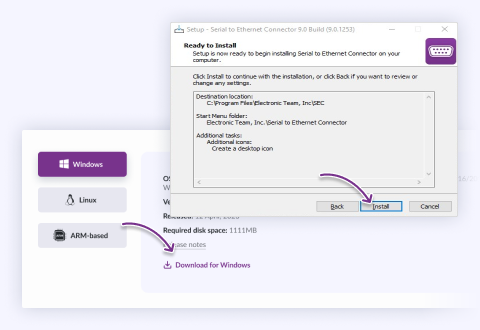
Install Serial to Ethernet Connector on the host with the physical serial port and the VM that will access the device.
Use buttons on the download page to select your OS
2
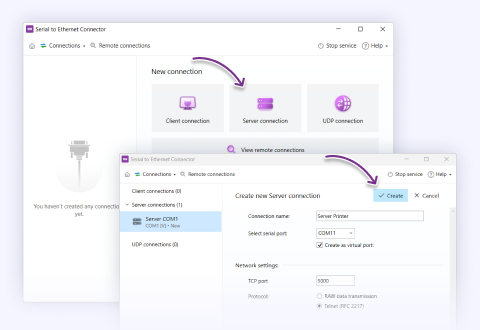
Set up a TSP server connection using Telnet on the host.
Start a server connection on the physical computer
3
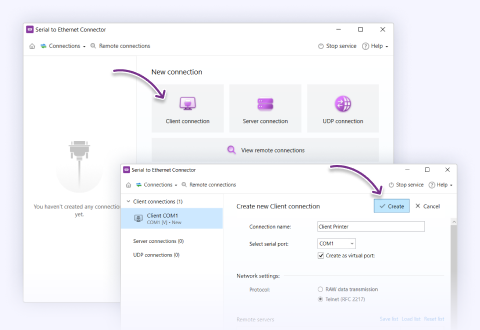
Set up a TSP server connection using Telnet on the host. On the VM, open the “Remote connections" tab and locate the server created on the physical machine. Click “Connect” and select a name for the virtual port. Click “Create” to establish the virtual port.
Create a client connection in the virtual machine
4
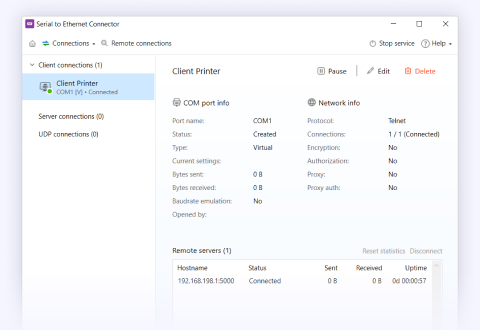
You can now communicate with the device attached to the physical port through the VM’s virtual port with the same level as functionality of a direct physical connection.
You can now check the status of the connection

What customers say

4.9 overall rank, based on 372 users reviews
Successfully used by 150+ companies worldwide

Frequently Asked Questions

Yes — it's a first-class scenario, supported on Hyper-V, VMware, VirtualBox and XenDesktop. The key thing to understand is how: SEC does not hook the hypervisor's emulated UART. You install SEC on the host as a server connection, install SEC again inside the guest, and the guest connects as a client over the virtual network. The guest then sees a virtual COM port that behaves like a local one, while the physical device stays on the host.

Because it works over the guest's virtual NIC, two things follow. The guest OS must be new enough to run current SEC (Windows 7 SP1 / Server 2008 R2 SP1 or newer, or a supported Linux), and the guest needs a working network route to the host. If your physical port is on the same machine and only one local VM needs it, the hypervisor's own built-in COM passthrough may be simpler and free — SEC earns its place when the device is on a different machine, several VMs need it, or you're on a VDI/broker stack that doesn't expose a host COM port at all.

Answered by Nikolai Svarachevsky · Lead Developer

Yes, with the same rule that governs any multi-client sharing: use a Raw server connection on the host, which accepts multiple client VMs, and each VM receives a copy of the device's output. In Telnet (RFC 2217) mode the connection is peer-to-peer — one VM at a time — because remote port control can't be shared across clients.

So the trade-off is Raw (many VMs, but no remote baud/signal negotiation — set the port on the host) versus Telnet (one VM, full port control). And the write caution applies here too: several VMs can safely read one device, but if multiple VMs send commands to a single command/response device their bytes will interleave on the one physical port. For that, designate one controlling VM or serialize commands at the application level.

Answered by Nikolai Svarachevsky · Lead Developer
Yes — this is effectively a networked null-modem between two guests, and it's a clean use of SEC. Create a virtual COM port in each VM and connect them through SEC (one side as server, the other as client, since the two connection types are interchangeable). Each program opens its local virtual COM port as if a serial cable ran between the two machines, and SEC carries the bytes across the virtual network in between. No physical serial hardware is involved at all.

This is a common way to link two applications that only know how to speak over a COM port when they now live in separate VMs. The usual guidance applies: for a strict request/response handshake between them, keep it a simple two-party (peer-to-peer) link rather than trying to fan a shared port to several endpoints, and if either program depends on tight signal-line timing, test it — the network hop between guests is not a zero-latency wire.

Answered by Nikolai Svarachevsky · Lead Developer
The connection re-establishes rather than resuming instantly, and how fast is largely up to you: SEC has a configurable reconnection interval that sets how often it retries a dropped link. When a VM is paused or saved, the guest freezes with an open TCP socket; on resume that socket is stale, so SEC tears it down and reconnects on the next retry. Set a short interval and recovery is quick — typically within seconds of networking coming back up in the guest — while during that brief window the application holding the virtual COM port may see the port drop or error before it returns.

Two practical notes. SEC has historically been sensitive to suspend/resume and Windows Fast Startup, so treat guest resume as a reconnect event and make sure your application tolerates a short port interruption. And any data a continuously-streaming device emitted while the VM was paused is not buffered for later delivery — it's gone — because SEC forwards live, it doesn't store and replay.

Answered by Bohdan Miniv · QA Engineering
Alongside the standard single license, SEC offers a dedicated Single License for Virtual Machine. It exists because the VM scenario involves SEC endpoints running inside guest instances, and the VM license covers that usage model rather than a single physical installation. If you're deploying SEC into virtual machines, this is the license type to size your purchase against.

Because licensing terms and exact coverage can change and depend on how many VM endpoints you're running, confirm the current details on the pricing page or with the sales team before you buy at scale — that way you're matched to the right license for your deployment rather than discovering a mismatch later.

Answered by Bohdan Miniv · QA Engineering
That's expected behavior, not a bug. When the Create as virtual port option is checked, the port's default settings are greyed out on purpose: for a virtual port, the parameters (baud rate, parity, data/stop bits) are defined by whatever application opens the port, not fixed in SEC. The application requests the mode it wants when it connects, and the virtual port adopts it.

This is the right model for a virtual port because a real serial device's settings only matter at the physical end. If you're bridging to a real port and want to pin its parameters, configure them on the real-port side; the virtual side follows the application. If you expected to hard-set the virtual port's rate independently of the app, that's simply not how virtual ports work — and forcing it wouldn't help, since the app's requested mode is what actually governs the session.

Answered by Nikolai Svarachevsky · Lead Developer
Yes. SEC runs as a Windows service, which means all your connections are automatically re-established on system boot — before any user logs in. That's important for unattended machines and servers that need their shared ports available the moment the box comes up, without someone signing in.

It also means you don't have to keep the GUI open. Once everything is configured, you can close the interface and the service keeps every connection running in the background. The GUI is only a control panel for the service, not a requirement for the connections to stay up.

Answered by Nikolai Svarachevsky · Lead Developer
Serial to Ethernet Connector
Work with COM port in Virtual Machine
14-day Free Trial available
License price starts at $259.95
Available for