Cookie
Electronic Team, Inc. uses cookies to personalize your experience on our website. By continuing to use this site, you agree to our cookie policy. Click here to learn more.

Broadcast serial device data via UDP

Serial to Ethernet Connector lets you transmit data and messages to all computers on your LAN using UDP.
14-day Free Trial available
License price starts at $259.95
Available for

Serial to UDP: Enhanced data communication flexibility

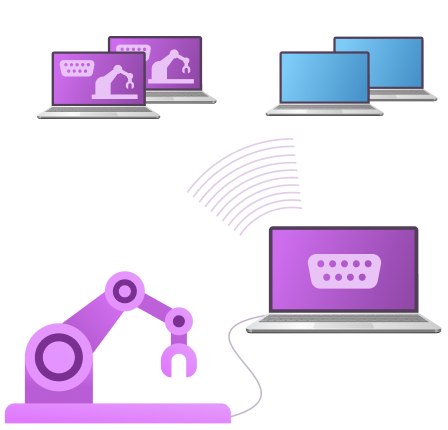
Greater flexibility is provided when using the UDP protocol due to its ability to encapsulate all data from a serial port. You can configure broadcast messages to simplify sending information to all network devices. No additional settings are required for anyone listening on the specified port to receive the messages.
Signals from serial hardware being received on multiple systems

How to share broadcast devices via UDP

1
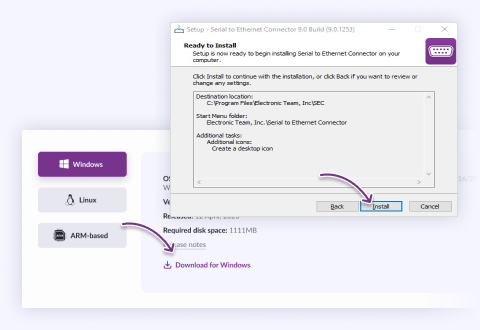
Install Serial to Ethernet Connector on the machine connected to the COM port device that will be used to send data.
Make sure to get the right version for your OS
2
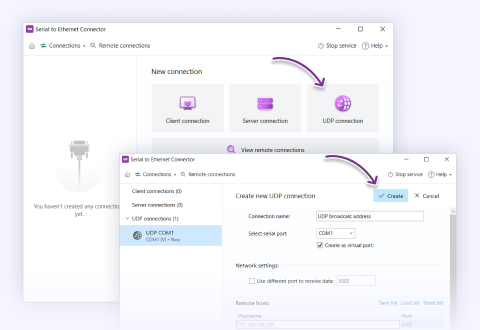
Launch Serial to Ethernet Connector and create a UDP connection using the application’s interface. The broadcast address is your network subnet, for instance, 196.178.0.255. On computers with multiple networks, you can configure designated broadcasts for each network using the UDP port.
Select “UDP connection” and set it up
3
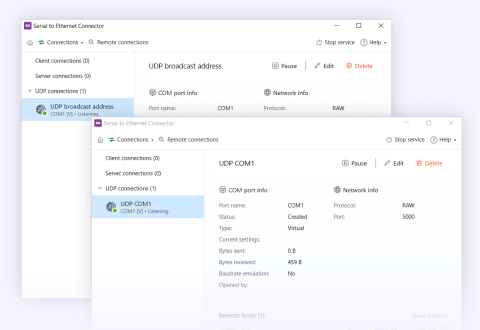
You can now broadcast data from the device’s serial port to an unlimited number of network devices or applications. Multiple connections can be set up with physical or virtual ports for a system that sends all data generated by any node to all clients.
The broadcasted device will appear on other computers in the connection list on the left
Note: Broadcast is a commonly used technique of delivering information generated by one sender to all network-attached devices. It is often used for sending messages to all network nodes or performing device discovery.

Configuring settings to support broadcast may require you to specify an address that reaches all network devices. IP networks commonly use 255.255.255.255 to communicate with all network nodes. Settings for broadcast are based on the technologies used in a given computing environment.

What customers say

4.9 overall rank, based on 372 users reviews
Successfully used by 150+ companies worldwide

Frequently Asked Questions

UDP itself doesn't tie sending and receiving to the same port number — a UDP endpoint has a local port it listens on and a destination port it sends to, and these can differ. SEC's UDP connection settings expose the addressing and port configuration, so asymmetric send/receive port arrangements are what UDP is designed to accommodate.

Set this up carefully so both ends agree: whatever port you send to must be the port the far end is listening on, and vice versa for the return direction. Because there's no connection handshake in UDP to catch a mismatch for you, a wrong port number simply results in silence — packets sent into the void with no error. Confirm the exact field names and layout in the current UDP connection dialog when configuring it.

VERIFY before publish: confirm the exact send/receive port fields and options in the current build's UDP connection dialog.

Answered by Bohdan Miniv · QA Engineering
Create a UDP connection on the machine attached to the device and set its destination to your network's broadcast address — the all-ones host address for your subnet (for a 255.255.255.0 mask that's the .255 address of your range) — together with the UDP port your listeners will use. Any machine on that subnet with an application listening on that port then receives the data, with no per-listener setup required on their side.

A couple of practical points: on a host with multiple network interfaces, set the broadcast for the specific network you intend, so you're not sending onto the wrong segment; and pick a port that isn't already in use by something else on the subnet. The exact broadcast address depends on your subnet mask, so base it on your actual network configuration rather than a fixed value.

Answered by Bohdan Miniv · QA Engineering
Yes, with a couple of approaches depending on what "several destinations" means. If you want every machine on the local segment to receive the data, a single broadcast (previous question) is the simplest way — one datagram the network delivers to all listeners on the port. If you want a specific set of destinations, you can direct UDP to particular addresses, and for a defined group across a properly configured network, multicast is the purpose-built option.

Two honest limits shape the choice. Broadcast does not cross routers — it stays within the local subnet — so "several destinations" on other subnets or over the internet can't be reached by broadcast; you'd use addressed (unicast) UDP to each, or TCP. And UDP gives no delivery guarantee to any of them, so if all recipients must reliably receive every message, UDP is the wrong transport regardless of how you address it.

Answered by Nikolai Svarachevsky · Lead Developer
RFC 2217 is a set of extensions to Telnet, and Telnet runs over TCP because the port-control negotiation depends on TCP's guarantees. Setting a baud rate or toggling a signal line is done with in-band commands that must arrive reliably and in order, and the two ends acknowledge each other as they negotiate. That's inherently a connection-oriented exchange.

UDP provides no connection, no ordering, and no guaranteed delivery — a command could be dropped or arrive out of sequence with the data it was meant to accompany, which would leave the two ends disagreeing about the port state. So UDP in SEC is strictly for carrying raw data, typically one-way broadcast; anything that needs parameter or signal control runs over TCP in Telnet mode. The transport and the feature set go together by necessity.

Answered by Nikolai Svarachevsky · Lead Developer
Use SEC's packetization controls to accumulate bytes before they go out. You can hold data until a specific delimiter character arrives, until a set time has elapsed, or until a block reaches a chosen size — then SEC emits the collected bytes as one datagram instead of dribbling them out in fragments. For a message-oriented protocol, triggering on the end-of-message character is usually the cleanest way to get one message per packet.

One thing to keep in mind that's specific to UDP: a datagram larger than the network's MTU will be IP-fragmented, and with UDP the loss of any fragment discards the whole datagram. So aim to have each accumulated message fit within a single MTU-sized packet where you can, rather than building very large datagrams. Small, self-contained messages are what UDP handles best.

Answered by Nikolai Svarachevsky · Lead Developer
For a raw-mode TCP server connection, yes — the Send data to setting has a Last active option that returns data only to the client that last responded, alongside Receive data from for the inbound side. If your goal is "answer whoever just asked," that's the documented way to do it, and TCP is the natural fit because each client has its own tracked connection.

Over UDP broadcast specifically, this doesn't apply in the same way — broadcast is a one-to-many outbound model with no per-client connection to key a reply off. So if you need last-writer return routing, use a raw TCP server with Send data to → Last active rather than UDP broadcast. If you specifically need it on UDP, describe the exact flow to support and we'll confirm what the current build allows.

Answered by Bohdan Miniv · QA Engineering
Serial to Ethernet Connector
Broadcast Serial Port Device over UDP
14-day Free Trial available
License price starts at $259.95
Available for