Cookie
Electronic Team, Inc. uses cookies to personalize your experience on our website. By continuing to use this site, you agree to our cookie policy. Click here to learn more.

How to Share Serial Devices over a Network

Serial to Ethernet Connector lets you share COM port devices from remote computers with the same functionality as a direct physical connection to the peripheral equipment.
14-day Free Trial available
License price starts at $259.95
Available for

Share COM port devices over LAN and Internet

Computer Numerical Control (CNC) machines are found in many manufacturing facilities. These devices are noisy and possibly dangerous, making it uncomfortable for employees to work near the equipment. Operators communicate with a CNC using a computer running dedicated software. Serial to Ethernet Connector enables workers to access the CNC remotely from a network-connected computer. This functionality promotes a safer and more pleasant work environment while communicating with the CNC from a remote location.
A computer with a serial device connected to a network

How to share a serial-connected CNC over Ethernet

1
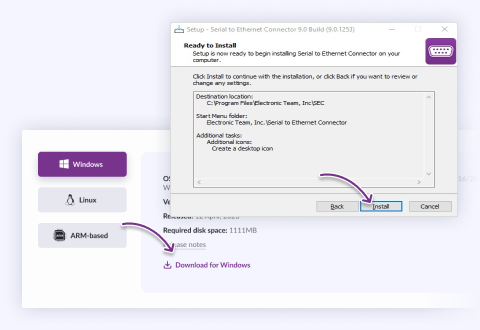
Install the Serial to Ethernet Connector software on the computer running the communication software and the machine connected to the CNC unit.
Select your OS on the website, download the installer and run it
2
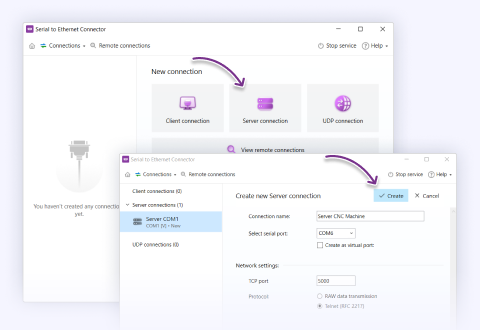
Set up the TCP service via telnet on the computer connected to the CNC.
Select “Server connection” and choose Telnet in “Network settings”
3
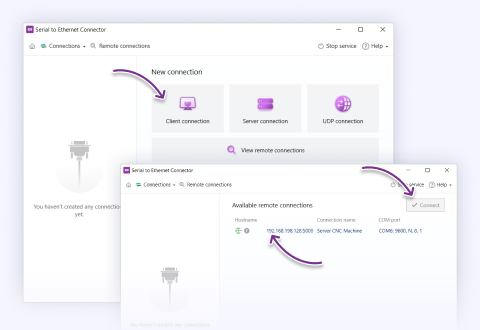
Configure a virtual serial port on the machine running the communication software to connect to the CNC device.
Choose “Client connection” on the remote machine
4
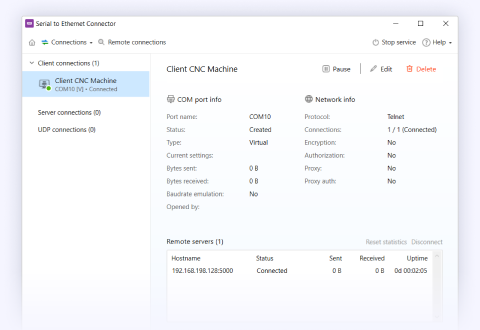
You can now access and control the CNC device as if you had a physical connection to the equipment.
Your new connection can be seen in the list on the left

What customers say

4.9 overall rank, based on 372 users reviews
Successfully used by 150+ companies worldwide

Frequently Asked Questions

Both. On a LAN, the connection is straightforward and low-latency. Over the internet, it works too — you just need the server side reachable at a routable address, the chosen TCP port open through the firewall/NAT, and, because the link now leaves your trusted network, SEC's authentication and traffic encryption switched on (they're opt-in, not default).

The honest caveat is that the internet adds latency and occasional jitter that a LAN doesn't. For streaming or relaxed request/response, that's a non-issue; for a protocol with tight response-time windows, that added round-trip can matter, and you should test with your real device before committing. SEC moves the bytes reliably over TCP — it can't remove the physics of a long network path.

Answered by Nikolai Svarachevsky · Lead Developer
Yes, when the shared port is a server connection in Raw mode, it allows multiple clients, and every connected client receives a copy of the device's output. This is ideal for a device that emits data to many consumers (a GPS receiver, a sensor feed). Note that Telnet (RFC 2217) mode is peer-to-peer — one client at a time — because per-session port control can't be shared, so multi-client sharing means Raw mode and giving up remote baud/signal negotiation.

One important limit: many computers can safely read one device, but many computers writing commands to one device is unsafe. A serial line has no multi-master arbitration, so overlapping commands from different clients interleave into corrupted bytes on the one physical port. Fan-out to many readers, yes; uncontrolled multiple writers, no — arbitrate commands through one controlling client if the device is command/response.

Answered by Nikolai Svarachevsky · Lead Developer

No — and it's worth being clear because it's a common assumption. SEC is a transparent byte forwarder, not a protocol converter. Bytes that enter the serial port come out the virtual port unchanged; Modbus RTU stays Modbus RTU. Your application on the far end still speaks the exact serial protocol the device speaks — SEC just carries that conversation across the network.

If you actually need RTU framing repackaged into Modbus TCP (different framing, no CRC, a proper TCP transaction header), that's protocol translation, and you want a dedicated Modbus gateway instead. SEC fits when both ends already talk the same serial protocol, and you only need to move it over a network. "Reach the device remotely" is us; "change what the device speaks" is not.

Answered by Nikolai Svarachevsky · Lead Developer
The software layer itself adds little — generally a small, sub-10 ms overhead under normal local conditions. But we won't quote a single universal number, because the figure that matters is dominated by your network, not by the SEC: on a LAN, total added latency is minimal; across the internet or a VPN, the network round-trip is the real cost, and it can range from a few milliseconds to hundreds depending on distance and congestion.

Bandwidth is essentially never the bottleneck — serial data rates are tiny next to any modern network. Latency is the thing to design around. If your protocol tolerates it (streaming, relaxed polling), you'll never notice. If it enforces tight response windows, measure the real round-trip on your actual path before committing, and remember that SEC's buffering controls trade a little added latency for cleaner framing when you need it.

Answered by Bohdan Miniv · QA Engineering
Yes. SEC's connection settings include packetization controls precisely for this, including a "send data when a character with a given code is received" option. Set it to your protocol's end-of-message byte (a carriage return or line-feed for line-oriented ASCII, for instance) and SEC will accumulate incoming bytes and push them to the network as one unit when that delimiter arrives, instead of forwarding bytes piecemeal.

This is genuinely useful for keeping message framing intact across a network that would otherwise split or coalesce a byte stream, and it pairs with the related controls — hold for a set time, or send once a block reaches a given size. The trade-off to keep in mind: any "wait until…" rule adds a little latency by design, since you're deliberately holding bytes until the trigger. For most framed protocols that's exactly the behavior you want.

Answered by Nikolai Svarachevsky · Lead Developer
The minimum requirement is simple: install SEC on the machine that has the serial port you want to share. That side publishes the port over the network, and the other end can talk to it as an ordinary network connection — if your remote application can open a raw TCP socket itself, it connects directly and needs no SEC installed. That far end could even be a hardware device (a terminal or console server) that already speaks the protocol over the network.

You only need SEC on both ends when both ends have to present a real COM port to their local software. In that case each node runs SEC to expose the port locally and SEC carries the data between them. Put simply: install SEC on every node where an application expects to see a COM port, and skip it anywhere the software already speaks TCP directly — or where the endpoint is hardware.

Answered by Nikolai Svarachevsky · Lead Developer
On Windows, SEC stores its connection settings in the registry, so migrating or backing up a configuration is just a matter of exporting the relevant key. On 32-bit systems it lives at HKEY_LOCAL_MACHINE\SOFTWARE\Electronic Team\SEC\Config\; on 64-bit systems at HKEY_LOCAL_MACHINE\SOFTWARE\Wow6432Node\Electronic Team\SEC\Config\.

Export that key with the Registry Editor (or reg export), copy the .reg file to the target machine, and import it there. One caveat worth stating: the target machine should have the same real ports available if your connections reference specific physical COM ports — virtual-port connections transfer cleanly, but a connection bound to COM3 assumes a COM3 exists on the new box.

Answered by Bohdan Miniv · QA Engineering
Serial to Ethernet Connector
Share your serial port over the network
14-day Free Trial available
License price starts at $259.95
Available for